Build an Obsidian Second Brain That Runs Itself
On this page
Most people’s second brains eventually become a larger backlog of things to organize.
The problem is not Obsidian, Zettelkasten, PARA, Daily Notes, or linked notes. These methods depend on a hidden assumption: you will keep working as your own information manager, reliably and indefinitely, for free.
You archive articles, break down ideas, add links, resolve conflicts, review material, and merge old notes. A few busy days are enough to disrupt the system. Saved material grows, while reusable knowledge shrinks.
What a second brain needs is a background team that can keep working.
This article presents a practical design: use a local Obsidian Markdown vault as the foundation and agents for overnight processing. People capture material; an automated workflow organizes it, extracts ideas, adds links, reviews conflicts, and summarizes results.
During the day, you drop material into an inbox folder. At night, agents process it by role. The next morning, you receive a briefing: what arrived, which claims conflict, which topic threads became more complete, and what deserves your attention today.
TL;DR: Design your second brain as a local research department. People make judgments and capture material; agents handle overnight processing, inspections, and reminders.
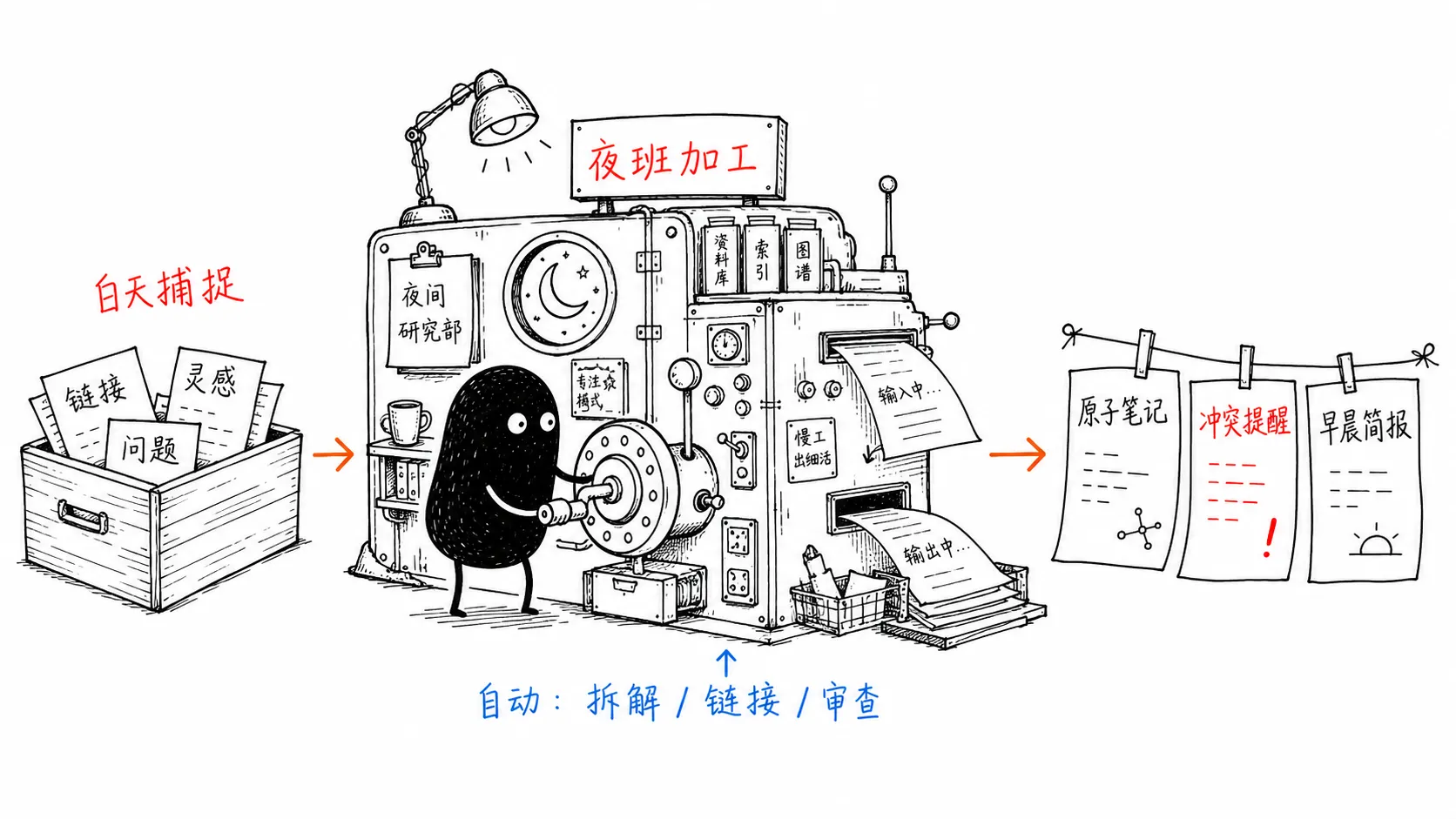
Your Second Brain Needs a Night Shift
A useful model for a second brain is a small research department. You work the day shift; agents work the night shift.
During the day, people do what they do best:
- Notice a valuable article.
- Capture an idea.
- Record a judgment.
- Save a question.
- Flag a lead worth investigating later.
These inputs can be rough—even a few sentences. The priority is to get raw material into the system before trying to organize it perfectly.
At night, the next shift takes over:
- Retrieve full text from saved links.
- Break long articles into independent ideas.
- Find related older notes.
- Create bidirectional links.
- Flag conflicts with earlier claims.
- Update topic syntheses.
- Produce a reading briefing for the next day.
The product goal is simple:
People handle judgment and capture. Machines handle organization and inspection.
The purpose is to reduce low-value organizational work so you can focus on judgments that matter.
Who This System Is For
It suits three groups:
- People who collect material over time: you save articles, papers, podcasts, videos, and ideas, but rarely revisit and organize them.
- People who write regularly: you want Obsidian to hold source material and also show which topics are ready to develop.
- People willing to use AI in knowledge processing: you want help with retrieval, idea extraction, linking, and conflict checks, while keeping human control over writing and judgment.
It is less suitable for:
- People who prefer manual organization: if you enjoy weekly reviews and filing, this system may be unnecessary complexity.
- People unwilling to review AI output: trustworthiness is essential. Without human review, hallucinations and incorrect links can quickly contaminate the vault.
Role Design: A Research Team
Asking one AI chat window to “organize my notes” can create another tool that needs constant direction.
A more dependable approach splits overnight work into roles. Each role has one category of task, clear boundaries, and inspectable results.
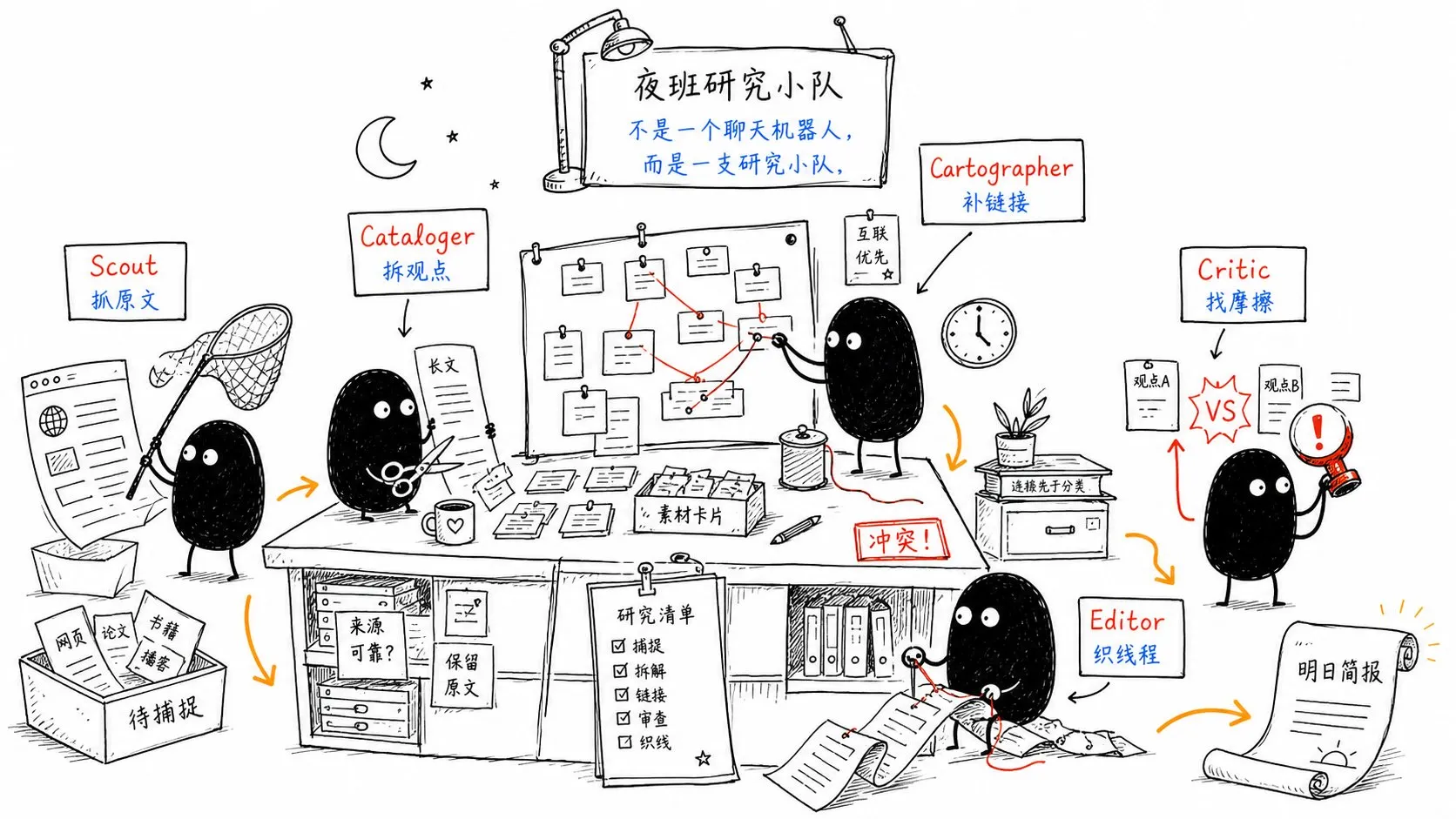
1. Scout: Gather Sources
The Scout acquires external material.
It reads your reading list, opens webpages, papers, blog posts, and PDFs, and saves original content in sources/. Its job is to bring back as much of the source as possible, without summarizing, rewriting, or judging it.
2. Cataloger: Create Atomic Notes
The Cataloger breaks source material into atomic notes.
An article with eight distinct ideas might produce eight notes. Each note carries one core idea and must be traceable to its source.
3. Cartographer: Maintain the Knowledge Map
The Cartographer maintains the map of connections.
For each new note, it searches for related older notes and links them. Bidirectional links become a navigable network of thought rather than just an attractive graph.
4. Critic: Find Friction
The Critic is the most important role.
It looks for points of friction:
- Does a new note conflict with an older one?
- Does a judgment have a source?
- Does new material weaken an earlier conclusion?
- Is a plausible inference insufficiently supported?
It flags these issues for your briefing rather than making the final judgment for you.
5. Editor: Synthesize Threads
The Editor combines related notes into topic threads, such as battery cost curves, AI agent workflows, or personal knowledge management.
These are living documents that keep changing as new material enters the system.
Organize Folders by Processing Stage
Many people begin with topic folders:
AI/
Productivity/
Writing/
Investing/
Health/
This looks clear at first, but knowledge often crosses topics. One idea may relate to AI, writing, and productivity. Forcing it into one folder merely shifts the organizational burden.
Agents work better with a structure based on processing stages:
brain/
├── 0-raw/          # Raw inputs: ideas, links, excerpts, and temporary notes
├── 1-desk/         # Agent workspace: intermediate processing files
├── 2-atoms/        # Atomic notes: one idea per file
├── 3-threads/      # Topic threads synthesized from multiple atomic notes
├── sources/        # Read-only copies of articles, webpages, and PDFs
├── briefings/      # Daily briefings and weekly audit reports
├── playbooks/      # Agent task instructions
└── house-rules.md  # Rules every agent must follow
Each file has a clear role.
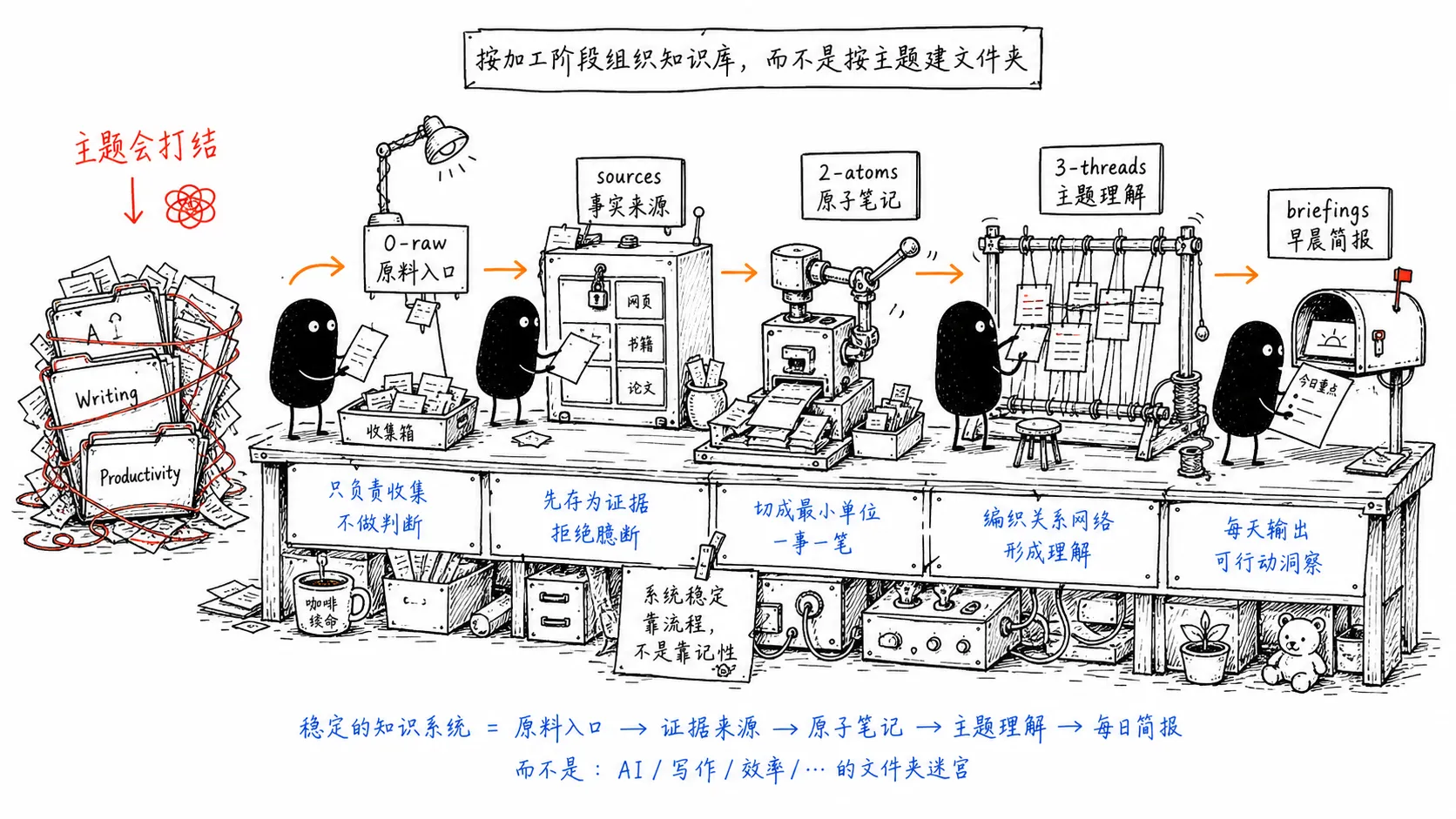
Keep 0-raw/ and sources/ Read-Only
Raw captures and original sources are the factual foundation.
Agents can read them and derive notes, but must not alter them without authorization. Otherwise, new notes cite old notes, which themselves came from AI summaries. After several rounds, it becomes difficult to distinguish original facts from model-generated additions.
Keep 2-atoms/ Atomic
One file should express one claim.
This makes linking, conflict detection, and synthesis more accurate. Long documents are useful for reading; atomic notes are the reusable components of a second brain.
Use 3-threads/ for Understanding
Atomic notes are materials. Topic threads organize them into understanding.
As you collect notes on Obsidian, MCP, agents, and knowledge management, the Editor can maintain an automated-second-brain thread. It turns related material into structured arguments that become useful for writing, decisions, and project reviews.
Treat 1-desk/ as a Temporary Workbench
Intermediate files, drafts, and pending merges should stay outside permanent notes.
Clear or archive 1-desk/ at the end of each night shift.
Write house-rules.md First
Set boundaries before allowing agents to process notes automatically.
A working house-rules.md might start like this:
# House Rules

## Pipeline

- 0-raw/: read-only inbox; do not modify original captures.
- 1-desk/: temporary workspace; clean up after tasks finish.
- 2-atoms/: permanent atomic notes, one claim per file.
- 3-threads/: topic syntheses; update existing threads first.
- sources/: read-only archive of original material.
- briefings/: reports for the user.

## Prime Directive

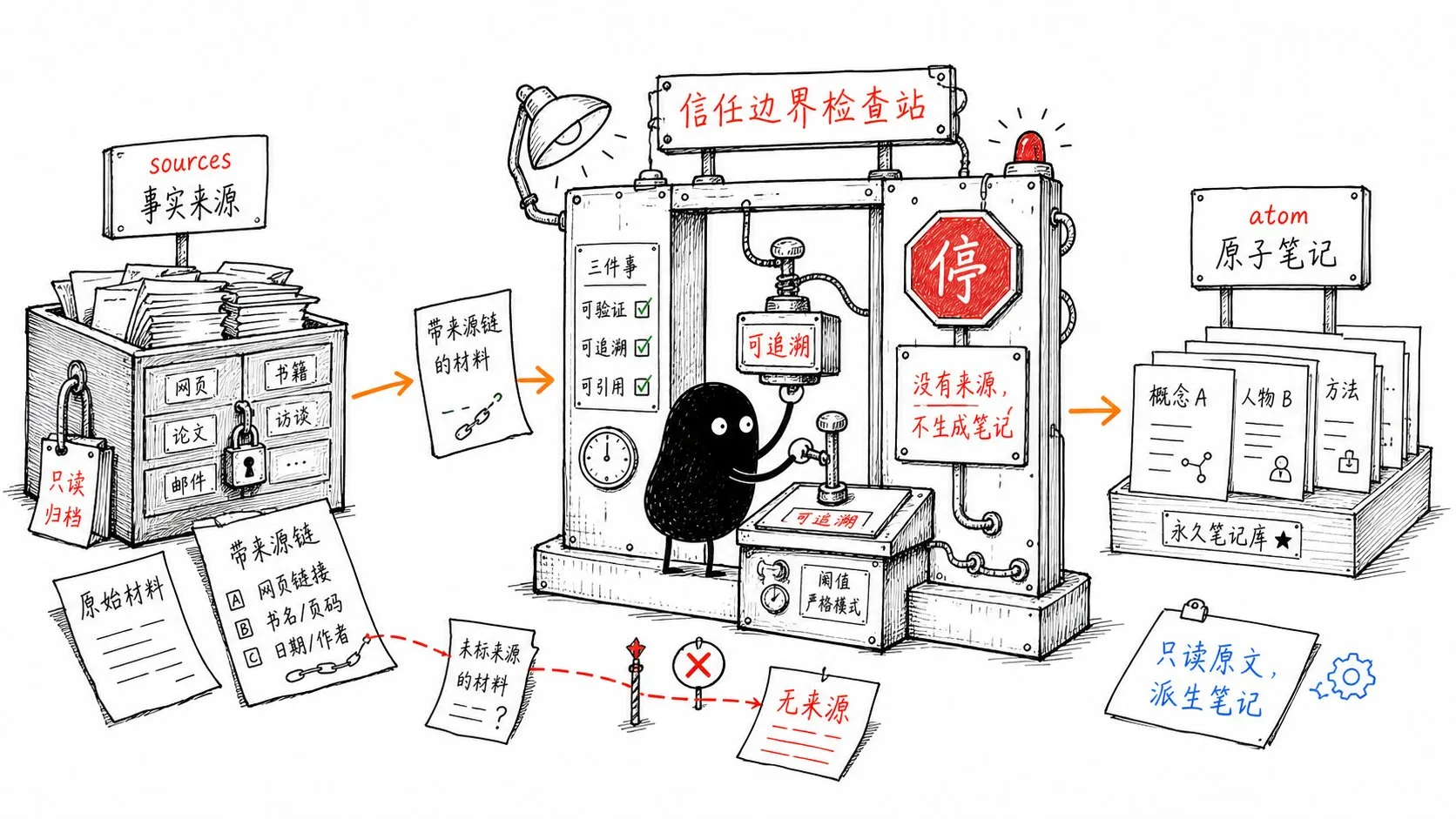
Every atomic note must be traceable to a real source in 0-raw/ or sources/.
No source, no note.
Do not fill gaps with content that merely sounds plausible.

## Working Rules

1. Each atom expresses one claim.
2. Before creating an atom, search for a related note that could be extended.
3. Link each atom to at least two related notes; flag it for review if none can be found.
4. When a new claim conflicts with an old one, add a [FRICTION] section instead of silently overwriting it.
5. Do not delete old notes; mark outdated content [RETIRED] and move it to archive.
6. After each task, update the relevant thread and write a briefing.

## Authority

Agents may write only to 1-desk/, 2-atoms/, 3-threads/, and briefings/.
Destructive operations, bulk renaming, deletion, and overwriting require human confirmation.
The crucial rule is the Prime Directive: no source, no note.
It determines whether the result is a trustworthy knowledge system or a collection of fluent hallucinated summaries.
What a Complete Night Shift Looks Like
Suppose you save this thought in 0-raw/ during the day:
If sodium-ion batteries can really reach a pack cost of $56/kWh,
the claim that lithium resources will limit EV adoption may need reassessment.
Compare this with the battery cost curve material saved earlier.
You do not need to organize it or immediately look up sources. The agents process it overnight.
The next day, 2-atoms/ might contain:
---
id: 2026-0617-sodium-ion-cost-parity
type: atom
certainty: tentative
sources:
  - sources/2026-06-17-sodium-ion-pack-cost.md
links:
  - '[[battery-cost-curves]]'
  - '[[lithium-supply-bottleneck-thesis]]'
  - '[[lfp-battery-chemistry]]'
---

## Claim

If mass-produced sodium-ion battery packs approach $56/kWh,
this may weaken the claim that lithium resource costs are the main bottleneck to EV adoption.

## Why It Matters

Battery cost curves directly affect EV prices, energy-storage economics, and upstream resource assumptions.

## [FRICTION]

[[lithium-supply-bottleneck-thesis]] treats lithium resource costs as a primary constraint.
The current material puts pressure on that claim. Both cannot hold fully at the same time; human judgment is needed.

## Open Questions

- Is $56/kWh a subsidized price or a sustainable mass-production cost?
- Could sodium-ion batteries' lower energy density offset their cost advantage?
- Does this cost apply only to specific vehicles or supply-chain conditions?
The briefing in briefings/2026-06-18.md might say:
### Contradictions You Should Resolve

- The new sodium-ion battery cost note conflicts with [[lithium-supply-bottleneck-thesis]].
  Decide today whether lithium scarcity remains a central assumption about EV adoption.
This is where the system becomes valuable. It compares new inputs with earlier judgments and highlights where you may need to rethink them.
Four Playbooks for Executable Nightly Tasks
Split the overnight workflow into four scheduled tasks instead of assigning everything to one large job.
1. Scout Run: Gather Sources at 11 p.m.
# Scout Run

## Job

Read the links in 0-raw/reading-list.md.

For each link:

1. Open the webpage and extract its main text.
2. Save it unchanged to sources/YYYY-MM-DD-{slug}.md.
3. Add frontmatter: url, captured_at, and word_count.
4. Leave a pointer to the pending material in 0-raw/.

## Rules

- Retrieve only; do not summarize.
- Record [UNREACHABLE] when retrieval fails; do not block the whole job.
- Do not modify the original reading-list.md.
2. Refinery Run: Extract and Link at 3 a.m.
# Refinery Run

## Job

Process all pending material in 0-raw/.

For each item:

1. Read the original capture and related source.
2. Break it into atomic notes.
3. Search for similar existing atoms before creating new ones.
4. Add related links to each atom.
5. Check for conflicts with older notes.
6. Add [FRICTION] where needed; do not automatically overwrite.
7. Archive the raw capture after processing.

## Hard Rules

- Follow the Prime Directive.
- Do not rewrite sources/.
- Flag uncertain merges for human review.
3. Editor Run: Write the Briefing at 6 a.m.
# Editor Run

## Job

1. Find atoms created or modified in the past 24 hours.
2. Update related topic threads in 3-threads/.
3. Write briefings/YYYY-MM-DD.md.

## Briefing Format

### What Came In

### Contradictions You Should Resolve

### Threads That Grew

### One Thing Worth Your Attention Today
4. Audit Run: Check Health Every Sunday Evening
# Audit Run

## Job

Scan the vault and generate briefings/audit-YYYY-MM-DD.md, reporting:

1. Isolated atoms without incoming or outgoing links.
2. Notes with certainty: tentative that have not been reviewed for 14 days.
3. [FRICTION] items unresolved for more than seven days.
4. Atoms without a sources field.
5. Threads unchanged for 30 days despite related new material.

## Rule

Report only; do not repair automatically.
The schedule could be:
0 23 * * *  Scout Run
0 3 * * *   Refinery Run
0 6 * * *   Editor Run
0 22 * * 0  Audit Run
Retrieval, extraction, synthesis, and auditing remain independent, making failures easier to locate.
Which Agents Can Implement This?
The original proposal used Kimi Work, a local desktop agent described publicly as supporting local files, real browser sessions, and parallel multi-agent workflows. Public reports from June 2026 connected Kimi Work with Kimi K2.6, WebBridge, and Agent Swarm; some mentioned up to 300 subagents and 4,000 collaborative task steps.
You do not need 300 agents to implement the architecture. It depends on four capabilities:
- Reading and writing local Markdown files.
- Running tasks on a schedule.
- Calling a browser or retrieving webpage text.
- Splitting work into parallel tasks, or at least processing files in batches.
Other local agents, scripts, MCP servers, Obsidian plugins, and automation tools can provide a similar workflow. The important parts are the rules, directory structure, permissions, and verifiable results.
Essential Safety Boundaries
Automated access to a knowledge base can be useful, but it introduces risks. Start with these safeguards.
1. Put the Vault Under Git
Initialize Git at the root of brain/.
Make a commit after each night shift, with the date and a task summary. This allows recovery from incorrect edits, merges, or contaminated notes.
2. Begin with Human Review
Start with agents producing drafts and briefings. After reviewing several runs, gradually allow more direct writes. Deletion, overwriting, and bulk file moves should always require human confirmation.
3. Review [FRICTION] Regularly
Unresolved conflicts make the system noisy.
Spend 20 minutes each week reviewing the audit and resolving friction older than seven days. Human judgment should decide which claim is newer or more reliable, or whether both apply under different conditions.
4. Review Notes Without Sources
Add a source, downgrade the note to a personal idea, or archive it.
Do not let untraceable conclusions enter the permanent knowledge layer.
5. Keep Write Permissions Narrow
At first, avoid direct edits to mature documents in 3-threads/. Instead:
- Write a draft in
1-desk/. - Show the differences in a briefing.
- Merge into
3-threads/after approval.
Expand permissions as trust grows.
What This System Changes
The first change is clear: you no longer organize every piece of material by hand.
Previously, you might save 20 articles and process only two. Now you can drop them into the inbox and let the system extract reusable knowledge blocks.
The second change matters more: the system can point out conflicts with your earlier thinking.
People struggle to remember every judgment they wrote three months ago. An agent can compare them and say, “The claim you saved today differs from your earlier conclusion on the same topic.” That is more useful than note search alone.
The third change compounds over time.
After several months of updates to 3-threads/, many topic documents may become more complete than your immediate memory. They are structured understanding built from material you have read, written, and evaluated yourself.
A second brain should help preserve and improve judgment, rather than simply accumulate material.
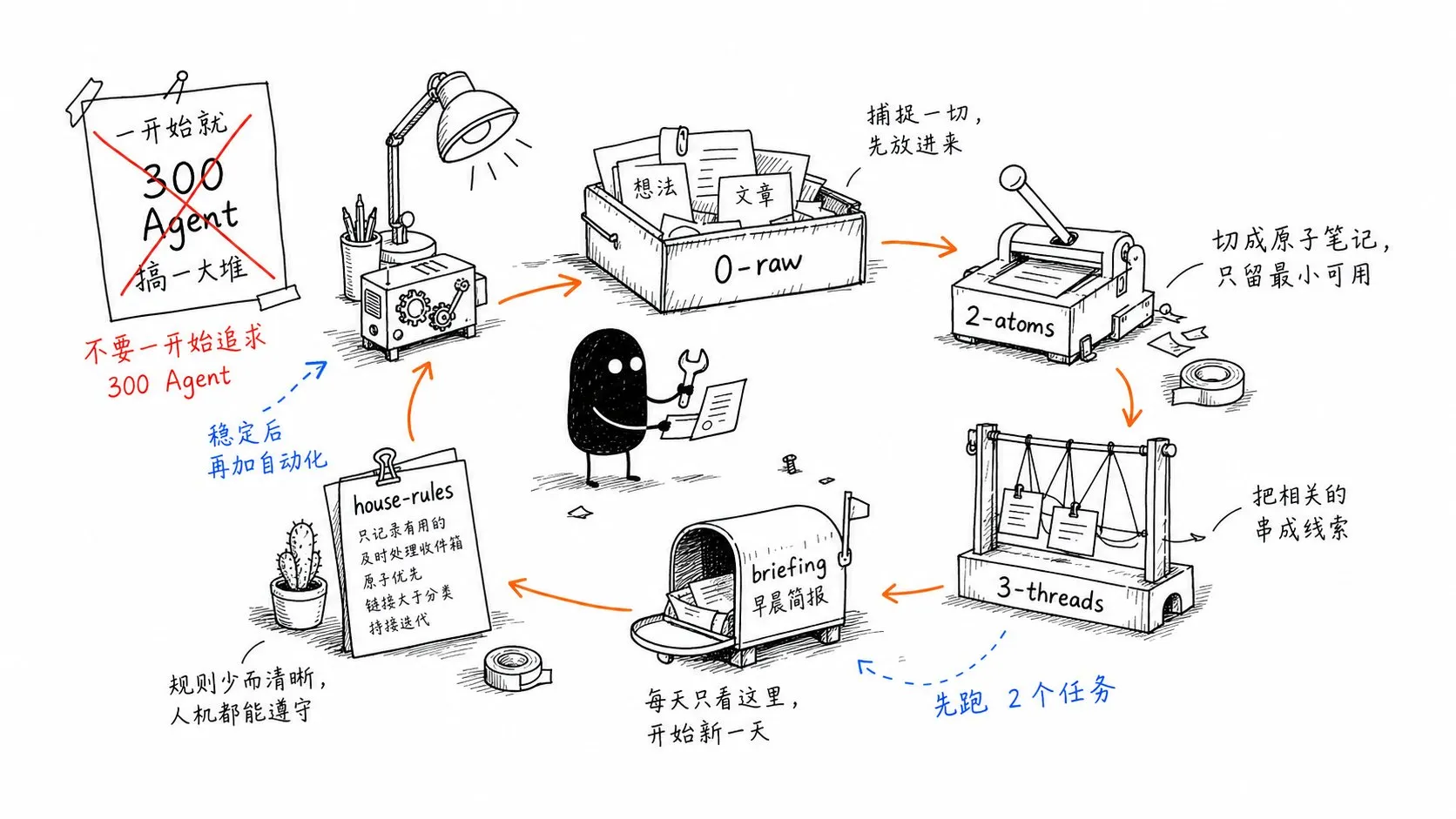
A Minimum Viable Version
You can start with a smaller system:
brain/
├── 0-raw/
├── 2-atoms/
├── 3-threads/
├── sources/
├── briefings/
└── house-rules.md
Implement just two tasks:
- Process
0-raw/into2-atoms/each night. - Generate
briefings/YYYY-MM-DD.mdeach morning.
After the workflow becomes reliable, add Scout, Editor, Audit, browser retrieval, MCP, and automatic Git commits.
Get three folders and two tasks working consistently before chasing hundreds of agents. That already puts the system ahead of many second-brain setups.
A 30-Minute Startup Checklist
To start today:
- Create a
brain/vault. - Add
0-raw/,2-atoms/,3-threads/,sources/, andbriefings/. - Write
house-rules.md, starting with the Prime Directive. - Put three real inputs into
0-raw/. - Ask the agent to produce drafts without writing to permanent directories.
- Approve one atomic note, then allow writes to
2-atoms/. - Read the next morning’s briefing and decide whether the workflow saves time.
If, after seven days, the briefing helps you decide what to read better than Obsidian’s native search, the system is worth automating further.